Accessories
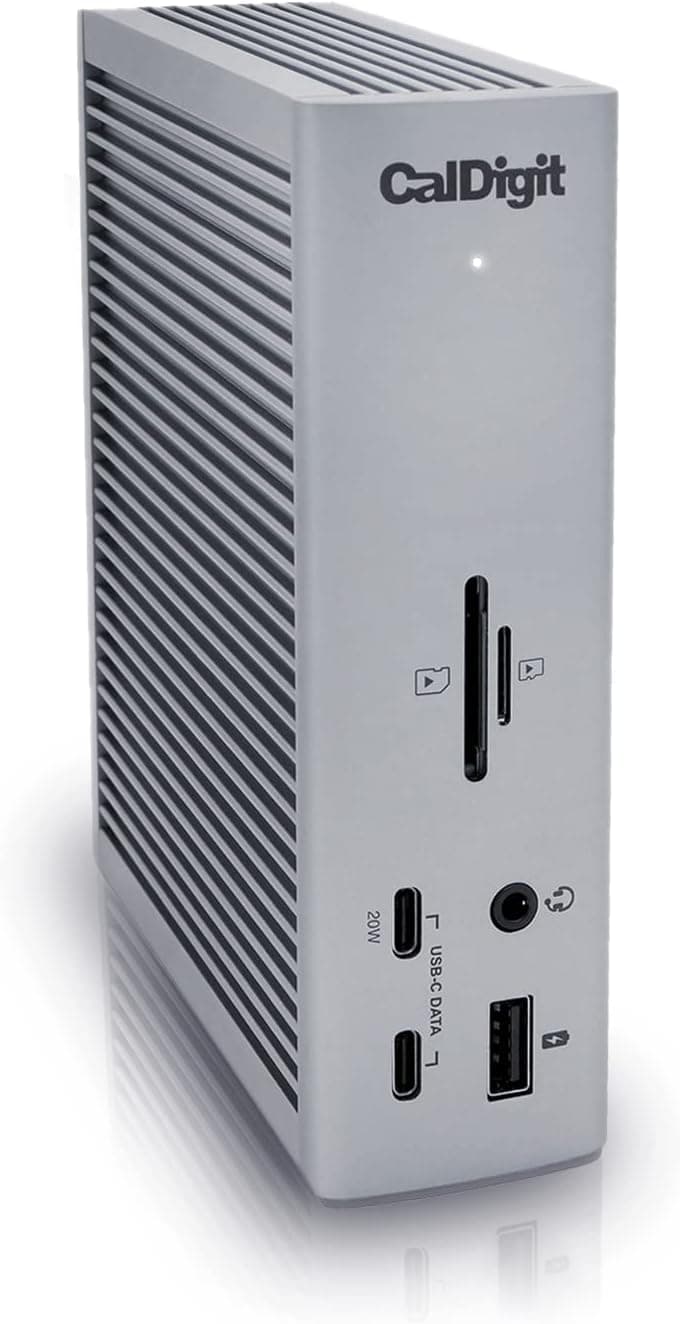
CalDigit TS4 Thunderbolt 4 Dock
Best-in-class Thunderbolt dock for power users demanding bandwidth and multi-device connectivity.
$379.99
via Amazon
Total ports
18 (3× TB4, 8× USB, 2× Ethernet, 3× Audio, card readers, DisplayPort)
Power delivery
98W via single cable
Max display output
Single 8K@30Hz or dual 6K@60Hz (M1 Pro–M4 Macs)
Thunderbolt bandwidth
40Gb/s per port (3 native TB4 ports)
Why we picked it
The TS4 consolidates 18 ports into a single connection, delivering 98W charging and up to 8K display support—critical for creatives and engineers running multi-monitor setups. The three Thunderbolt 4 ports (40Gb/s each) and 2.5GbE networking eliminate bottlenecks in data-heavy workflows, while broad OS compatibility (macOS M1–M4, Windows, Chrome) justifies the premium tier.
Pros
- 98W power delivery charges most laptops plus 18 connected devices simultaneously via one cable, eliminating desk clutter and wall outlet hunting.
- Three native Thunderbolt 4 ports (40Gb/s) provide genuine bandwidth for 4K+ video work and fast external storage without daisy-chain limitations.
- 2.5GbE Ethernet delivers 2.5× faster speeds than standard gigabit, measurably improving NAS and cloud sync performance on compatible networks.
Cons
- Display support varies significantly by hardware: M1–M3 base Macs limited to single display only; Windows maxes out dual 4K instead of dual 6K—real constraint for multi-monitor professionals.
- Requires certified Thunderbolt 4 or Intel-certified cable for full 40Gb/s performance; older Thunderbolt 3 or USB-C hosts cap speeds to legacy specs, limiting future-proofing on non-Thunderbolt 4 systems.
Performance
The TS4 sustains 40Gb/s Thunderbolt 4 throughput on all three native TB4 ports, essential for 4K/6K video editing and high-speed RAID arrays. The 2.5GbE Ethernet delivers measurable gains over standard gigabit when paired with compatible NAS or 2.5GbE routers. USB ports max out at 10Gb/s, a solid compromise for mixed peripheral loads, though Thunderbolt 3 and older USB-C hosts see performance capped to their native specs—not the dock's limitation, but worth confirming before purchase.
Design & Build
The aluminum chassis exudes durability and fits neatly under most monitors or at desk edge due to compact footprint. The bundled 0.8m certified cable is short enough to manage but long enough to route to a power strip; longer runs require Intel-certified third-party replacements. Cable strain relief is solid, and the metal enclosure dissipates heat effectively during sustained multi-port use, though you'll notice minor fan activity under heavy load.
Value for Professionals
At $379.99, the TS4 sits in the premium docking tier but justifies the cost for creatives and engineers who'd otherwise buy separate USB hubs, Ethernet adapters, and display cables. The three TB4 ports alone prevent the daisy-chain bottleneck common in cheaper single-port docks, directly improving throughput in video and data workflows. It's not for occasional laptop users; it's built for desk-bound professionals who need industrial-grade connectivity without compromise.
Who is it for?
Video editors and colorists
Native support for dual 6K displays at 60Hz on M-series Macs and single 8K on Windows allows for pro-grade multi-monitor grading and timeline workflows without external adapters.
Data engineers and scientists
Three Thunderbolt 4 ports enable simultaneous high-speed connections to external SSDs, RAID arrays, and computation nodes without USB bandwidth contention.
Hybrid workers with Mac and iOS
Single 98W dock charges MacBook Pro and simultaneously supports iPad Pro or iPhone 15/16 Pro via USB-C while keeping network and peripherals live.
Frequently asked questions
Will this dock work with my M1 MacBook Air?+
Yes, but with limitations: M1 base models support only a single external display. If you need dual displays, you must upgrade to M1 Pro or later. Full Thunderbolt 4 functionality and 98W charging work on all M-series Macs.
Do I need the certified cable, or can I use any Thunderbolt 4 cable?+
An Intel-certified Thunderbolt 4 or USB4 cable is required for full 40Gb/s performance and 98W charging stability. Using non-certified cables may result in intermittent disconnects or reduced power delivery—the supplied 0.8m cable is included, but replacements must be certified.
How much faster is the 2.5GbE port versus standard Ethernet?+
The 2.5GbE port is 2.5× faster than 1Gb Ethernet (250 Mbps vs. 125 Mbps), measurably improving large file transfers to compatible NAS systems and cloud sync speed. It's backward compatible with 1Gb devices but won't show gains on older infrastructure.
CalDigit TS4 Thunderbolt 4 Dock
$379.99